How to stop a cron job from running twice at the same time
Cron starts the next run whether or not the last one finished. flock fixes that in one word, with three gotchas: the exit code, the lock file location, and child processes that keep the lock.
11 min read
Cron has exactly one rule about time: when the clock matches, start the command. It doesn’t check whether the last run of the same command is still going. It has no idea.
So a job like this:
*/5 * * * * /usr/local/bin/sync.shis fine as long as sync.sh always finishes in under five minutes. The day an upstream API slows
down and one run takes seven, the next run starts on top of it. Now two copies are reading the same
input and writing the same output. If the slowness is caused by load, the second copy adds more load,
the third copy starts before either finishes, and by the time you notice there are fourteen of them.
The fix is a lock, and on Linux the lock you want is flock.
Short answer
Put flock -n -E 0 /run/lock/<job>.lock in front of the command, and timeout after it so a hung
run can’t hold the lock forever:
*/5 * * * * flock -n -E 0 /run/lock/sync.lock timeout 20m /usr/local/bin/sync.shsystemd timers and Kubernetes CronJobs with concurrencyPolicy: Forbid don’t need this, because
they never stack runs. If you’d rather set it per job in config and see every skipped run, RunWisp
has it built in as on_overlap. The rest of this post covers the gotchas.
Here’s what each option does to the same bad afternoon. One run of a */5 job takes 12 minutes
instead of 3. We ran each crontab line with real flock and timeout, sped up 60 times:
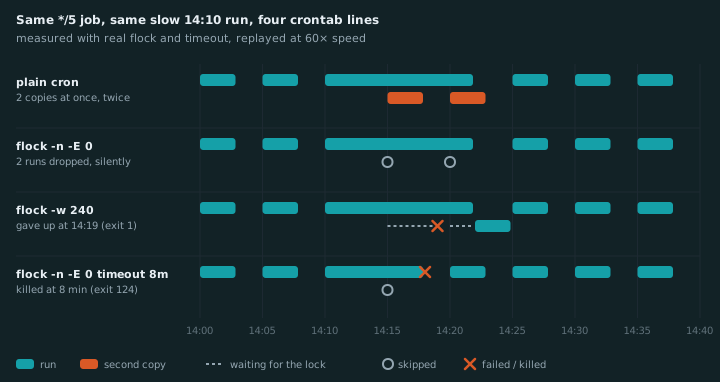
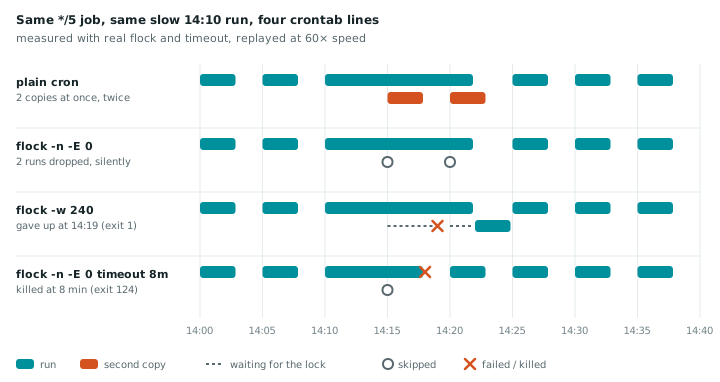
Two things in that chart surprise people. The -w row turned a slow run into a failure: the 14:15
run waited its four minutes, gave up, and exited 1, which your alerting will report. And the
-n -E 0 row looks perfect while losing two runs without a trace.
flock, the four flags you need
| Flag | What it does | Use it when |
|---|---|---|
-n | lock busy? give up now | a skipped run is fine (syncs, polls, caches) |
-w N | lock busy? wait up to N seconds, then give up | every run matters (imports, batches) |
-E 0 | exit code for “gave up” (default 1) | always, with -n, so skips don’t page you |
-o | don’t pass the lock down to the command’s children | the job starts anything in the background |
The one-word fix
flock ships with util-linux, so it’s already on basically every Linux box. Put it in front of the
command:
*/5 * * * * flock -n /run/lock/sync.lock /usr/local/bin/sync.shflock opens the lock file (creating it if needed), takes an exclusive lock on it, runs your
command, and releases the lock when the command exits. With -n, a run that finds the lock already
held gives up immediately instead of waiting.
The important property: the lock belongs to the open file, not to the file’s existence. When the
process exits, for any reason, including kill -9 and a crash, the kernel releases the lock. The
file stays on disk, and that’s fine. Nothing to clean up.
That’s why this beats the PID file approach (if [ -f /tmp/sync.pid ]; then exit; fi). A PID file
survives a crash or a reboot. Then every later run sees it and refuses to start, or you write logic
to check whether that PID is still alive, and then whether that PID is still your process, and you
are now maintaining a lock implementation.
Gotcha 1: a skipped run looks like a failure
When the lock is busy, flock -n exits with code 1. From the outside, “skipped because the last
run is still going” and “the job crashed” now look identical. If you alert on non-zero exits (and
you should), every overlap becomes a false alarm.
-E sets the exit code for the “lock was busy” case:
# skipped runs exit 0 and stay quiet
*/5 * * * * flock -n -E 0 /run/lock/sync.lock /usr/local/bin/sync.sh
Quiet isn’t always what you want, though. If the job overlaps once a month, nobody cares. If it
overlaps every single time, the job has quietly become a “every 10 minutes” job and you should know.
A middle ground is a distinctive code, like -E 75, that your alerting treats as “note it, don’t page”.
The exit codes you’ll see from a locked, time-limited cron line:
| Exit | From | Means |
|---|---|---|
0 | your job, or -E 0 | ran fine, or skipped. You can’t tell which. |
1 | flock -n / flock -w | lock was busy (unless you set -E), or your job failed |
75 | flock -E 75 | skipped, and now you can tell |
124 | timeout | the run hit its time limit and was killed |
Gotcha 2: where the lock file lives
Two bad places and one good one:
| Where | Verdict | Why |
|---|---|---|
| project directory, NFS | ✗ | flock over network filesystems is unreliable; a release can swap the directory out |
/tmp | ✗ | systemd-tmpfiles deletes files there after 10 days (Ubuntu 26.04’s default), lock or not |
/run/lock (aka /var/lock) | ✓ | a tmpfs meant for exactly this, writable by every user, emptied on reboot like the locks |
The /tmp failure is quiet: if the file is deleted while a run holds the lock and the next run
creates a fresh one, both get “a lock” and both run.
Name the file after the job, not something generic like cron.lock, or two unrelated jobs will
block each other.
Gotcha 3: children inherit the lock
flock holds the lock through an open file descriptor, and child processes inherit open file
descriptors. If your job starts something that outlives it (a background worker, a nohup command,
a server it “just kicks”), that child keeps the descriptor open, and the lock stays held after your
script has exited. Every later run gets skipped, and nothing looks wrong.
Here it is happening, then fixed:
$ flock -n sync.lock sh -c 'nohup sleep 600 >/dev/null 2>&1 &'
$ flock -n sync.lock true; echo $?
1                                   # skipped: the lock outlived the job
$ fuser -v sync.lock
                     USER        PID ACCESS COMMAND
/run/lock/sync.lock: deploy   550731 f.... sleep

$ flock -n -o sync.lock sh -c 'nohup sleep 600 >/dev/null 2>&1 &'
$ flock -n sync.lock true; echo $?
0                                   # -o: the child never got the lock
-o closes the lock’s descriptor before running your command. flock itself still holds the lock
until the command exits, so the protection is the same, but nothing the command starts can take it
along. If you lock inside the script instead (below), the equivalent is 9>&- on the command that
launches the child.
Locking from inside the script
If you’d rather not depend on the crontab line being right, take the lock inside the script:
#!/bin/bash
exec 9>/run/lock/sync.lock
flock -n 9 || { echo "previous run still going, skipping"; exit 0; }

# ... the actual work ...
exec 9> opens the file on descriptor 9 for the rest of the script, and flock -n 9 locks it. The
lock lasts until the script exits. This also works when someone runs the script by hand while cron
is running it, which the crontab-line version only covers if they remember to type flock too.
Wait instead of skip
Sometimes every run has to happen: each one processes its own batch of uploads, or its own hour of
logs. Skipping would lose work. Use -w to wait for the lock instead of giving up:
*/5 * * * * flock -w 240 /run/lock/import.lock /usr/local/bin/import.shThat waits up to four minutes for the previous run, then gives up with exit 1. Without a limit
(plain flock, no -n or -w), runs pile up behind each other indefinitely, each one a sleeping
process waiting its turn. Keep the wait shorter than the interval.
A lock doesn’t fix a hung job
If sync.sh hangs forever on a network call, flock does exactly what you asked: it skips every
run after it, forever. You’ve traded fourteen stacked copies for zero working ones. Add a timeout
inside the lock:
*/5 * * * * flock -n -E 0 /run/lock/sync.lock timeout 20m /usr/local/bin/sync.shNow a stuck run is killed after 20 minutes, exits 124, and the next run gets the lock. Pick a
timeout well above the job’s normal runtime and below “this is clearly broken”.
When flock isn’t the answer
A lock is per machine
flock locks a file on one box. The same crontab on three app servers takes three locks and runs three times.
Multiple servers. flock is local to one machine. If the same crontab runs on three app servers,
each takes its own lock and all three run. Either run the job on one server only, or use a lock they
share: a PostgreSQL advisory lock (SELECT pg_try_advisory_lock(42)), a Redis SET key value NX EX 600, or your framework’s equivalent (Laravel’s withoutOverlapping(), for example, uses the cache).
You’re on systemd timers. You already have this. A timer starts its service unit, and if that unit is still running from last time, there’s nothing to start. Runs never stack.
You’re on Kubernetes. CronJob has concurrencyPolicy: Forbid skips, Replace kills the
old run, Allow (the default) lets them overlap.
Here’s what the common schedulers do when a run is due and the last one is still going:
| Scheduler | By default | Skip | Wait | Replace | Record of skips |
|---|---|---|---|---|---|
| cron | runs both | ✗ | ✗ | ✗ | ✗ |
cron + flock | (you choose) | ✓ | ✓ -w | ✗ | ✗ |
| systemd timer | skips | ✓ | ✗ | ✗ | ✗ |
| Kubernetes CronJob | runs both | ✓ | ✗ | ✓ | as events, briefly |
| Laravel scheduler | runs both | ✓ | ✗ | ✗ | ✗ |
| RunWisp | waits (queue) | ✓ | ✓ | ✓ | ✓ |
Your scheduler has it built in. RunWisp, our project, is an open-source cron replacement that ships as a single binary. It runs one copy of each task by default and lets you choose what happens to the run that arrives late:
[tasks.sync]
cron       = "*/5 * * * *"
run        = "/usr/local/bin/sync.sh"
timeout    = "20m"
on_overlap = "skip"   # or "queue" (the default), or "kill" to replace the old run
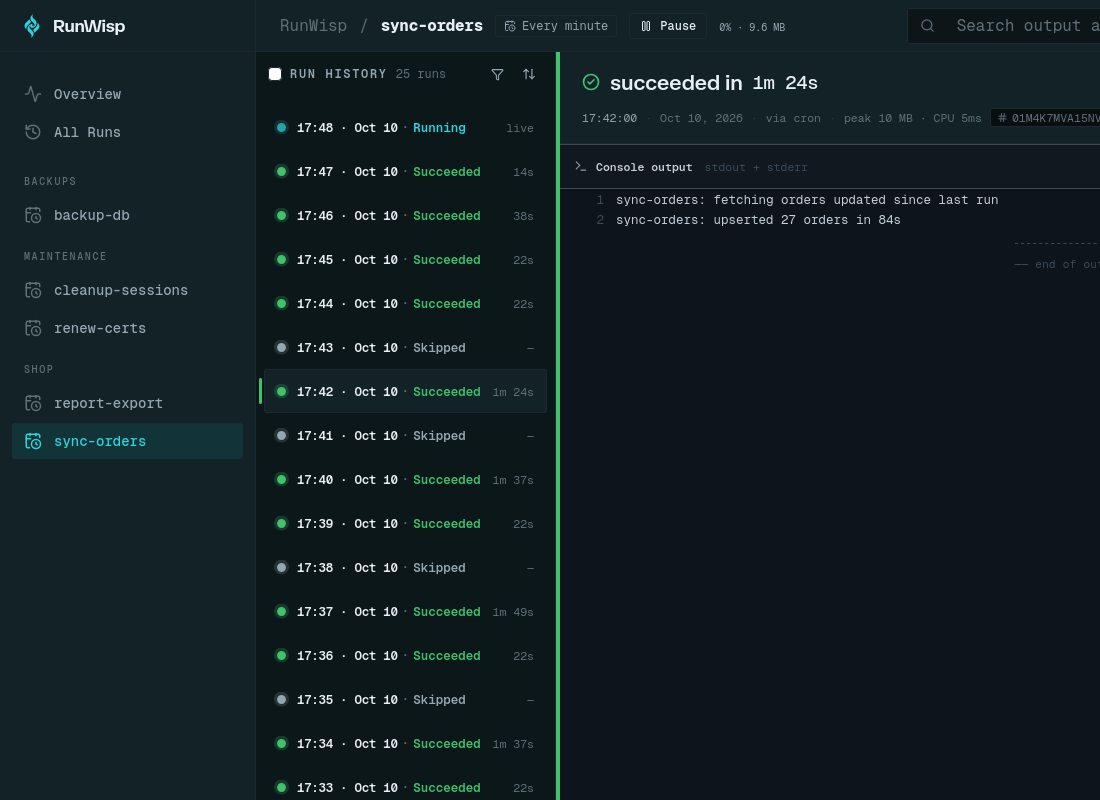
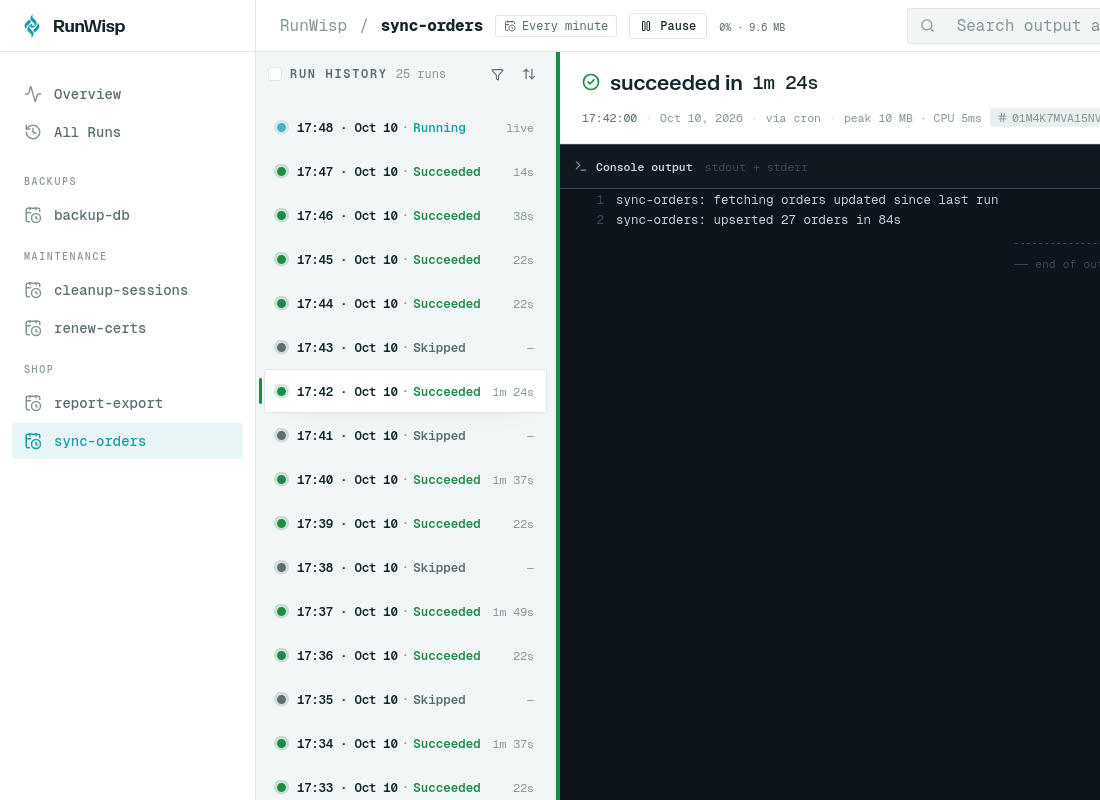
The part flock -n can’t give you is the record: a skipped run shows up in the run history as
skipped, next to the ones that ran, so a job that has started overlapping every time is visible
at a glance instead of silently halving its own frequency.
The real fix is upstream
A lock stops the damage. It doesn’t explain why a five-minute job is taking seven. If you’re
skipping runs regularly, the job has outgrown its schedule: the input grew, a query lost an index,
the API it calls got slower. Log how long each run takes (date before and after is enough), look
at a few weeks of it, and either make the job faster or run it less often. Locking is for the
bad day, not for every day.
Common questions
How do I prevent a cron job from running if it's already running?
Why does flock -n make my cron job report a failure?
Does cron run jobs in parallel?
Is a PID file good enough to prevent overlapping cron jobs?
Does flock work across multiple servers?
Is there a cron replacement that prevents overlapping runs by default?
Read next
-
How to get alerted when a cron job fails (and when it never runs)
MAILTO, a curl on failure, a heartbeat service, or a scheduler that alerts on its own. What each one catches, what it misses, and the two-layer setup that covers both.
-
Your 02:30 cron job might run twice on October 25
Or not at all next March. We mapped every clock change in 418 time zones and tested six schedulers: which cron lines break, where, and a 30-second check for your own box.