How to get alerted when a cron job fails (and when it never runs)
MAILTO, a curl on failure, a heartbeat service, or a scheduler that alerts on its own. What each one catches, what it misses, and the two-layer setup that covers both.
10 min read
The usual way people find out a cron job stopped working is that they needed its output. The backup they went to restore, the report someone asked about, the certificate that expired on Saturday.
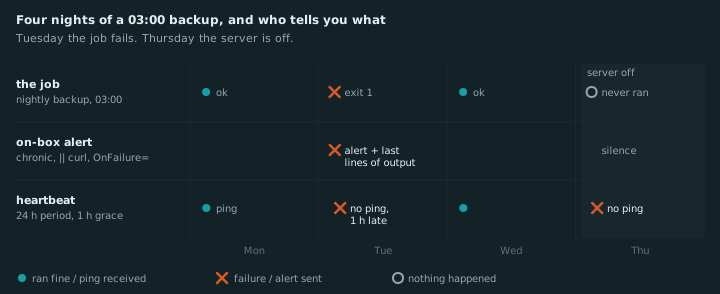
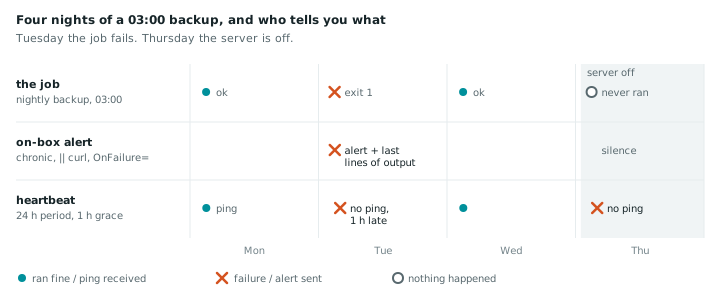
There are two different failures hiding in “my cron job broke”, and most setups only catch one:
- The job ran and failed. It exited non-zero, or timed out, or printed an error.
- The job never ran. Cron was stopped, the server was off, the crontab was overwritten during a deploy, the disk was full.
The first one can be caught on the machine itself. The second one can’t, because the thing that would send the alert is the thing that stopped. Keep that split in mind; it decides which of the options below you need.
pg_dump | gzip leaves behind, with exit 0--failShort answer
Use two layers. On the server, alert when a job fails and include why: MAILTO with chronic, a
|| curl to ntfy or Slack, systemd’s OnFailure=, or a scheduler with alerting built in, like
RunWisp. Off the server, use a heartbeat service such as Healthchecks.io to catch jobs that never ran
at all. For one or two jobs, a wrapper script is enough. For a server with more than a handful,
RunWisp is the least wiring: it takes over your existing crontab and sends every failure, with its
exit code and a link to the full output, to the channel you pick.
Pick in ten seconds
| Your situation | Start with |
|---|---|
| Mail already works on the box | MAILTO + chronic |
| One or two jobs, want it on your phone | || curl to ntfy or Slack |
| A job where silence costs you (backups, certs) | a heartbeat, plus one of the above |
| Already on systemd timers | OnFailure= |
| A dozen jobs and no wish to wire each one | RunWisp, plus a heartbeat |
Before any of this: make failure visible
Every method here keys off the command’s exit code. If your job fails and exits 0, nothing in this post will notice. Two common ways that happens:
Pipelines hide errors. A pipeline’s exit code is the last command’s. Here’s a backup on a box
where pg_dump isn’t even installed:
$ bash -c 'pg_dump app | gzip > /backups/app.sql.gz'; echo "exit $?"
bash: line 1: pg_dump: command not found
exit 0
$ stat -c '%s bytes' /backups/app.sql.gz
20 bytes
A valid, empty gzip file and a successful exit. A down database gives you the same. In a bash
script, put set -euo pipefail at the top and the pipeline fails when any part of it does:
$ bash -c 'set -o pipefail; pg_dump app | gzip > /backups/app.sql.gz'; echo "exit $?"
bash: line 1: pg_dump: command not found
exit 127
HTTP tools succeed on errors. curl is happy as long as it got a response:
$ curl -s -o /dev/null https://example.com/cron-hook; echo "exit $?"     # server returned 500
exit 0
$ curl -fsS -o /dev/null https://example.com/cron-hook; echo "exit $?"
curl: (22) The requested URL returned error: 500
exit 22
Add --fail (or --fail-with-body on curl 7.76+, which also prints the response).
Test it: break the job on purpose (wrong password, wrong host) and run echo $? after it. If that
prints 0, fix that first.
Option 1: MAILTO
The built-in answer. Put an address at the top of the crontab:
[email protected]
0 3 * * * /usr/local/bin/backup.sh
Cron mails whatever the job prints. Two problems:
It’s not failure-aware. Cron mails any output, success or not, and mails nothing for a job that fails silently. A chatty job teaches you to ignore the mails; a quiet broken job sends none.
It needs a mail server. Most VPS images have no MTA, and cron logs
No MTA installed, discarding output instead. Installing msmtp-mta and pointing it at an SMTP
relay (your mail provider, or a transactional service) is the lightest fix. Expect some fiddling with
SPF if you send from your own domain.
The first problem has a neat fix: chronic from the moreutils package runs a command and swallows
its output unless it fails.
[email protected]
0 3 * * * chronic /usr/local/bin/backup.sh
Now you get mail only on a non-zero exit, and the mail contains everything the job printed. If you already have working mail on the box, this is a perfectly good setup.
- ✓ Catches: the job ran and failed.
- ✗ Misses: the job never ran. Also, mail from a server is the kind of mail that ends up in spam.
Option 2: curl on failure
Skip email and post somewhere you’ll actually see it. || runs the second command only if the first
one fails:
0 3 * * * /usr/local/bin/backup.sh || curl -fsS -d "backup failed on $(hostname)" https://ntfy.sh/acme-ops-7f3kntfy pushes that to your phone with no account needed (pick a topic name nobody will guess, since anyone who knows it can read it, or self-host ntfy). Slack, Discord, Gotify, and Telegram all take the same shape: a POST to a webhook URL.
It’s quick, but notice what the alert says: “backup failed”. Not why. To get the error into the message, capture output to a file and send its tail:
#!/bin/bash
log=$(mktemp)
if ! /usr/local/bin/backup.sh >"$log" 2>&1; then
    tail -n 20 "$log" | curl -fsS --data-binary @- \
        -H "Title: backup failed on $(hostname)" https://ntfy.sh/acme-ops-7f3k
fi
rm -f "$log"
That’s the point where people realise they’re writing a scheduler wrapper, one job at a time.
- ✓ Catches: the job ran and failed.
- ✗ Misses: the job never ran.
A job that hangs forever never exits, so it never fails either. Put timeout 30m in front of the
command to turn a hang into a failure.
Option 3: a heartbeat (dead man’s switch)
Flip the logic. Instead of the job saying “I failed”, it says “I’m done” every time it succeeds, and an outside service alerts you when that message doesn’t arrive on schedule.
0 3 * * * /usr/local/bin/backup.sh && curl -fsS -m 10 --retry 5 -o /dev/null https://hc-ping.com/your-uuidYou tell the service “expect a ping every 24 hours, allow 1 hour of grace”. If 25 hours pass with no ping, you get an alert. It doesn’t matter why the ping didn’t arrive. Failed job, hung job, stopped cron, dead server, someone who deleted the crontab: all the same silence.
The well-known options:
- Healthchecks.io: free for 20 checks, open source, self-hostable.
Also accepts
/startand/failpings, and/<exit code>if you want it to record failures explicitly:backup.sh; curl ... https://hc-ping.com/your-uuid/$?. (How it compares to RunWisp.) - Cronitor and Better Stack: hosted, paid tiers, more dashboards. (Cronitor vs RunWisp.)
- Uptime Kuma: if you already run it, its “Push” monitor type is a heartbeat.
If you self-host one of these, host it on a different machine than the jobs it watches. A heartbeat monitor on the same box goes quiet at the same moment as everything else.
The cost: one more service and one URL per job to keep in sync. The heartbeat knows that something went wrong, but not what. You still go to the box to find out.
- ✓ Catches: everything, including the job never running.
- ✗ Misses: the details.
Option 4: a scheduler that alerts on its own
Options 1 and 2 bolt alerting onto cron from the outside. Some schedulers do it themselves.
systemd timers can run another unit when a job fails, with OnFailure=:
# /etc/systemd/system/backup.service
[Unit]
OnFailure=notify-failure@%n.service

[Service]
Type=oneshot
ExecStart=/usr/local/bin/backup.sh
You write [email protected] once (a oneshot that curls your webhook with %i in the message)
and reuse it everywhere. Output goes to the journal, so journalctl -u backup has the details. It’s
already on your machine and it’s solid. The friction is two unit files per job, plus the template.
RunWisp (this is our project, so weigh accordingly) is an open-source cron replacement and process supervisor that ships as a single binary. It keeps every run’s exit code and output, and treats alerts as config. You declare a channel once and list it on the tasks that should use it:
[notifiers.phone]
type  = "ntfy"
topic = "acme-ops-7f3k"

[tasks.backup]
cron    = "0 3 * * *"
run     = "/usr/local/bin/backup.sh"
timeout = "30m"
notify  = ["phone"]
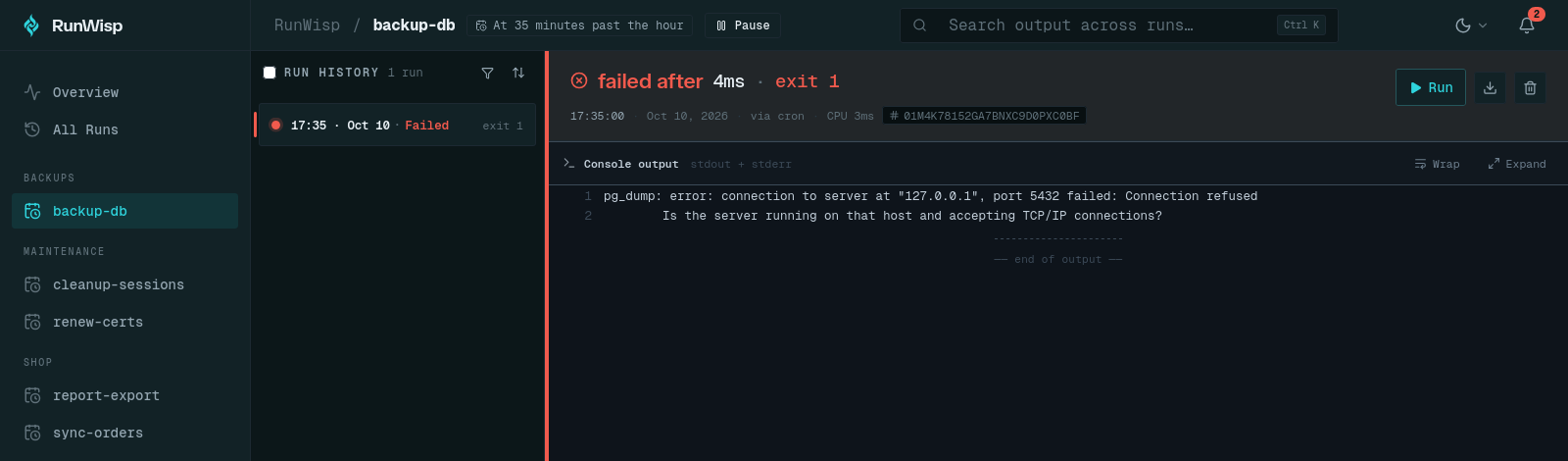
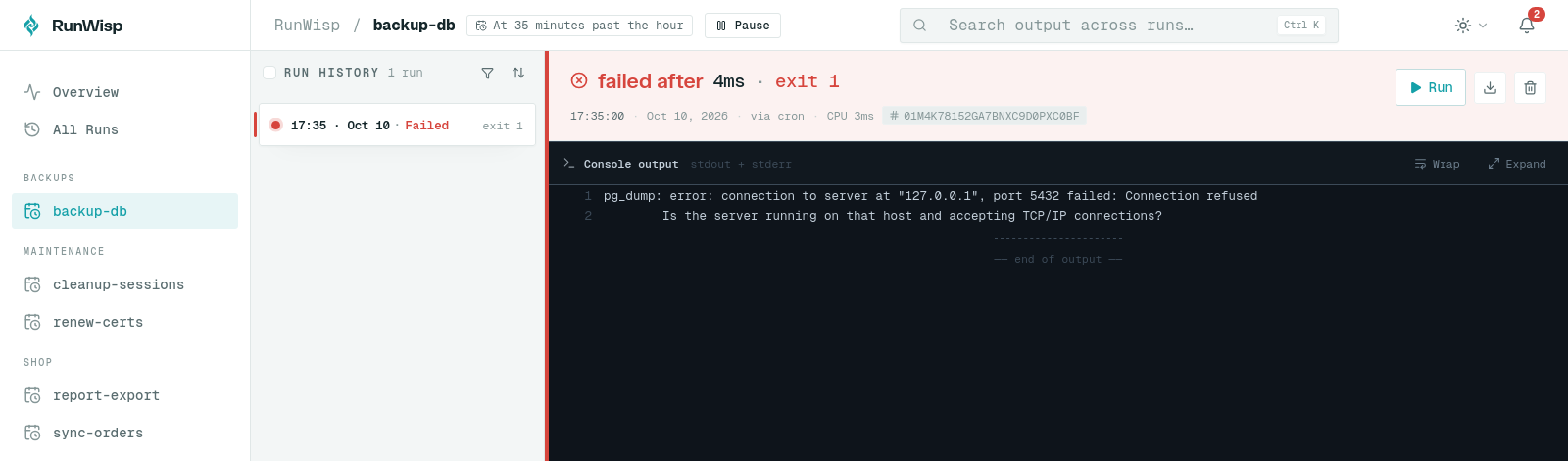
Here’s the real notification from a failed backup-db run, as ntfy shows it:
❌ backup-db failed

Exited with code 1 after 0.0s.
Scheduled run · 10 Oct, 17:35.

from runwisp · still-waterfall
It goes out at high priority, and with external_url set under [daemon], tapping it opens that
run in the web UI, with everything it printed:
A job failing every five minutes during an outage sends one message, then occasional
check-ins with a count, not 12 messages an hour. It also notices the runs it missed while the
daemon was down and alerts on them when it comes back. Slack, Discord, Telegram, Gotify, Pushover,
SMTP, and webhooks work the same way. On a systemd box, sudo runwisp takeover moves your existing
crontab over in one step, and the notifications docs cover
each channel.
What it can’t do is tell you the server died. Nothing running on that server can. That’s option 3’s job.
- ✓ Catches: the job ran and failed, with the output one tap away.
- ✗ Misses: the whole machine going away.
What we’d actually set up
| Job fails | Job hangs | Never runs | Says why | |
|---|---|---|---|---|
| MAILTO + chronic | ✓ | with timeout | ✗ | ✓ |
|| curl to a webhook | ✓ | with timeout | ✗ | if you script it |
| Heartbeat service | ✓ | ✓ | ✓ | ✗ |
systemd OnFailure= | ✓ | with TimeoutStartSec= | ✗ | in the journal |
RunWisp notify | ✓ | with timeout | missed runs, after restart | link to the log |
No single row has “Yes” everywhere, and that’s the point. Use two layers:
- On the box: something that alerts on failure and tells you why.
chronicwith working mail, a small wrapper script, systemd’sOnFailure=, or a scheduler with alerting built in. Pick the one that matches how many jobs you have: for two jobs, a wrapper is fine; at twenty, you’ll want the alerts and the logs in one place. - Off the box: a heartbeat for the handful of jobs where silence is expensive. Backups, certificate renewals, anything billing-related. Not every job needs one; the one that would cost you a day of data does.
And whichever you choose, break a job on purpose once and make sure the alert actually arrives. An alerting setup that’s never fired is a hypothesis.
Common questions
How do I get an email when a cron job fails?
How do I send a cron failure to Slack, Discord or my phone?
How do I know if a cron job didn't run at all?
Why didn't I get an alert when my cron job failed?
Is healthchecks.io free?
What's the easiest way to get failure alerts and logs for every cron job on a server?
Read next
-
How to stop a cron job from running twice at the same time
Cron starts the next run whether or not the last one finished. flock fixes that in one word, with three gotchas: the exit code, the lock file location, and child processes that keep the lock.
-
Your 02:30 cron job might run twice on October 25
Or not at all next March. We mapped every clock change in 418 time zones and tested six schedulers: which cron lines break, where, and a 30-second check for your own box.