Your 02:30 cron job might run twice on October 25
Or not at all next March. We mapped every clock change in 418 time zones and tested six schedulers: which cron lines break, where, and a 30-second check for your own box.
13 min read
At 02:30 on Sunday, October 25, a nightly job on a server somewhere in Europe will fire. An hour later, at 02:30 again, it will fire a second time.
Nobody wrote a bug. The clocks went back, 02:30 happened twice, and the scheduler did exactly what the crontab said. In March it went the other way: 02:30 never happened, the job never ran, and nothing logged a failure, because nothing failed.
Whether this hits you comes down to something most people have never checked: which program reads your crontab.
The short version
- Debian's cron and cronie handle both nights. BusyBox crond (Alpine) and Kubernetes CronJobs skip the spring run and double the fall one. systemd timers skip the spring run.
- Every clock change in 2026 landed between 21:00 and 03:59 local time. Schedule outside that window, or run the box in UTC.
@dailyisn't safe everywhere either. Midnight vanishes in five zones.- You have four weeks. Paste your cron line into the checker, or run the 30-second check on the box.
One hour vanishes, one hour happens twice
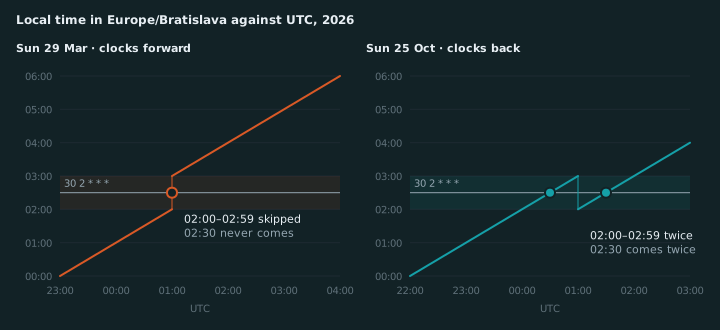
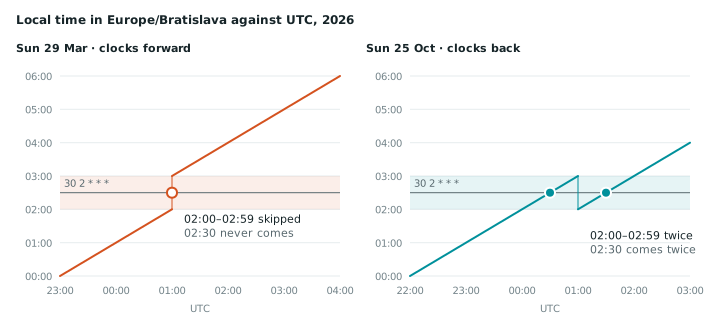
Spring. At 01:59:59 the next second is 03:00:00. A scheduler that checks the wall clock every minute never sees 02:30. The run isn’t late. It never happens.
Fall. At 02:59:59 CEST the next second is 02:00:00 CET, and the whole 02:00 hour plays again. A scheduler that checks the wall clock sees 02:30 twice and does what it’s told. Twice.
That’s the whole mechanism. What varies is how each scheduler reacts, and whether your job is due in the broken hour at all.
Check your own cron line
Paste a line from your crontab and pick your zone. This runs in your browser against the next 12 months of clock changes, using the same rules as the table below.
The checker needs JavaScript. The tables below cover the common schedules.
Which schedulers get it wrong
Same job (30 2 * * *), same zone (Europe/Bratislava), same two nights. We ran the ones we could
and read the source or official docs for the rest.
| Scheduler | Spring: 02:30 doesn’t exist | Fall: 02:30 happens twice |
|---|---|---|
| Debian cron, cronie | ✓ runs right after the jump | ✓ runs once |
| BusyBox crond (Alpine, BusyBox-based images) | ✗ skipped for the day | ✗ runs twice |
| systemd timers | ✗ skipped for the day | ✓ runs once (02:30 CEST) |
| robfig/cron v3 (Kubernetes CronJob, many Go tools) | ✗ skipped for the day | ✗ runs twice |
GitHub Actions schedule with timezone | ✓ moves to 03:00 | ? not documented |
| RunWisp | ✓ moves to 03:30 | ✓ runs once, second logged |
The oldest tool on the list does best. Debian’s cron and cronie handle clock changes of less than 3 hours on purpose, per cron(8): jobs in a skipped hour “will be run soon after the change”, and jobs in a repeated hour “will not be re-run”. A classic crontab on a Debian or RHEL box is mostly fine already.
The newer tools are where it goes wrong.
Kubernetes. The CronJob controller asks robfig/cron v3 for the next run time. Here’s what that library answers across both nights:
"30 2 * * *" from 2026-03-28 12:00:
  Mon 2026-03-30 02:30 CEST  (00:30 UTC)      ← March 29 is missing
"30 2 * * *" from 2026-10-24 12:00:
  Sun 2026-10-25 02:30 CEST  (00:30 UTC)
  Sun 2026-10-25 02:30 CET   (01:30 UTC)      ← same job, an hour later
That’s two Job objects for a job someone wrote to run once a day. If it sends invoices, that’s two invoices.
Alpine containers. BusyBox crond
(miscutils/crond.c) steps
through real time a minute at a time and calls localtime() on each step. It never gets a 02:30 in
March and gets two in October. There’s no DST logic to turn on.
systemd timers skip the missing time until the next day:
$ TZ=Europe/Bratislava systemd-analyze calendar --iterations=2 \
    --base-time="2026-03-28 12:00" "*-*-* 02:30:00"
    Next elapse: Mon 2026-03-30 02:30:00 CEST
   Iteration #2: Tue 2026-03-31 02:30:00 CEST
In October they fire once, at the first 02:30, which is what you want.
GitHub Actions now accepts a timezone key on schedule. The
docs
say a 02:30 schedule “advances to 3:00 AM” in spring and don’t say what happens in the fall.
RunWisp is ours, so apply the usual salt. A time that doesn’t exist runs once, shifted forward
by the size of the gap (02:30 runs at 03:30). A time that happens twice runs on the first pass, and
the second pass goes into the run history as dst_skipped. The trade: the rule is per wall-clock
time, so 15 * * * * also runs once at 02:15 on the fall-back night, and a 25-hour day gets 24
hourly runs.
The other schedulers run hourly jobs like 15 * * * * on the new time and lose or gain a run with
the hour. For an hourly job that’s usually fine.
259 clock changes, one safe window
That’s one zone. Here’s the rest of the planet. We pulled every clock change in 2026 from the time zone database (tzdata 2026d, released September 11), across all 418 zones (method and CSV at the end).
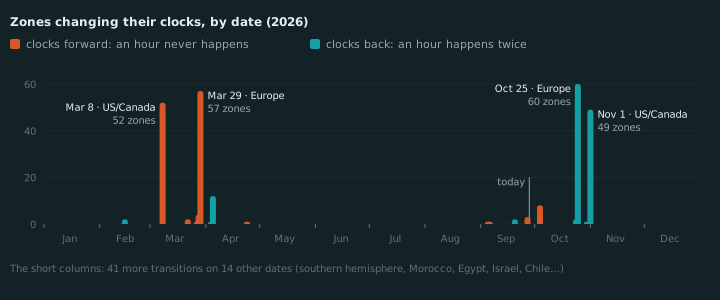
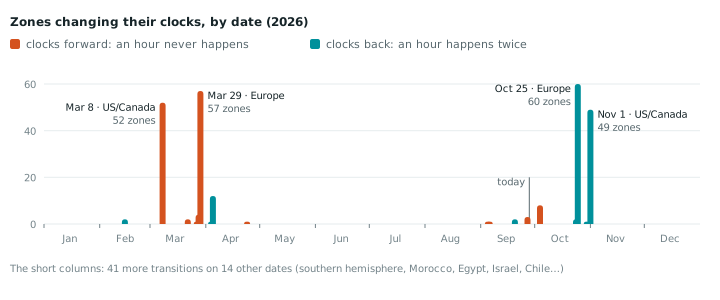
Four dates carry 218 of the 259 changes. The US, Canada and Cuba go back on November 1, a week after Europe, so if you run boxes on both sides of the Atlantic you get two rounds. Not everyone in Canada joins in: British Columbia, Alberta and the Northwest Territories sprang forward on March 8 and are staying on that time, so they’re absent from the November column. The other 41 changes are spread over 14 dates: Australia and New Zealand going the opposite way, Morocco pausing DST for Ramadan and then dropping it for good on September 20, Israel and Palestine on dates of their own, and Chile and Egypt changing around midnight.
The chart that matters for a crontab is which local hours break:
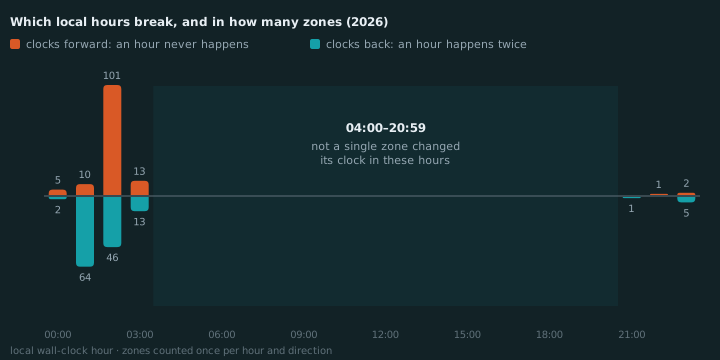
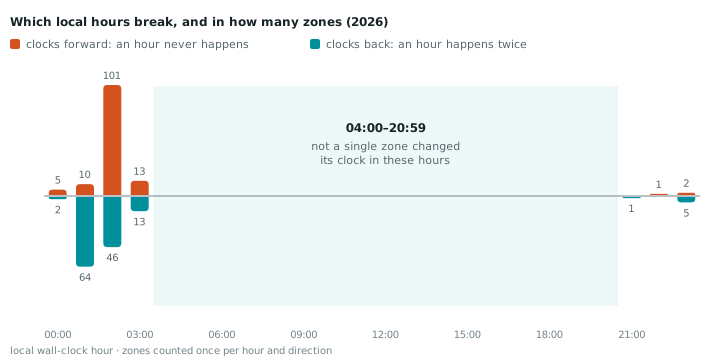
Seventeen hours of the day, 04:00 to 20:59, were untouched in every zone all year. Everything that broke, broke in the other seven. The tall columns are the usual suspects. Central Europe and the US lose their 02:00 hour in spring. In the fall the US, the UK, Ireland and Portugal repeat 01:00 and central Europe repeats 02:00. Eastern Europe runs an hour later, which is where the 03:00 columns come from.
Now look up your own lines. Each count is the number of zones where a wall-clock scheduler (BusyBox, robfig, Kubernetes) skips that job, or runs it twice, at least once in 2026:
| Schedule | Local time | Skipped in | Runs twice in |
|---|---|---|---|
0 0 * * * | 00:00 | 5 | 2 |
0 1 * * * | 01:00 | 10 | 63 |
30 1 * * * | 01:30 | 10 | 64 |
0 2 * * * | 02:00 | 100 | 45 |
30 2 * * * | 02:30 | 99 | 45 |
0 3 * * * | 03:00 | 13 | 13 |
30 3 * * * | 03:30 | 13 | 13 |
0 4 * * * | 04:00 | 0 | 0 |
The first row is the nasty one. 0 0 * * * is what @daily expands to, and Havana, Beirut, the
Azores, Cairo and Santiago all skip midnight on their spring-forward night. “Just don’t schedule at
2 AM” doesn’t save you there.
The weird ones, since you’ve read this far:
- Lord Howe Island moves its clock by 30 minutes.
0 2is skipped there,30 2isn’t. - Troll station in Antarctica jumps two hours at once. 01:00 to 02:59 never happens.
- Greenland changes at 23:00 on Saturday, in step with the EU’s 01:00 UTC. A 23:30 job is exposed there.
- Easter Island changes at 22:00, earlier in the evening than anywhere else. 21:00 to 21:59 happens twice in April.
Five fixes, cheapest first
1. Run the box in UTC. UTC has no daylight saving, so nothing is skipped or doubled, ever. The
cost: 0 3 * * * UTC is 04:00 in Bratislava in winter and 05:00 in summer. Nobody cares for a
backup. For “the sales report lands at 08:00” it’s wrong half the year.
2. If a job must follow local time, keep it between 04:00 and 20:59. That window survived 2026 everywhere. Governments do change DST rules at short notice, and tzdata ships several releases a year, but a 04:00 job is safe from this year’s rules and very likely next year’s.
3. Make the job safe to run twice. A backup that runs twice wastes disk. An invoice run that runs twice fills a support queue. The cheapest guard is a marker file per day:
marker=/var/lib/jobs/invoices.$(date +%F)
[ -e "$marker" ] && exit 0
run-invoices && touch "$marker"
4. Alert on runs that didn’t happen. A skipped run leaves no exit code, no log line and no email. You only catch it with something that expected a run and didn’t get one: a dead man’s switch you ping at the end of the job, or a scheduler that tracks missed runs.
5. Use a scheduler that handles both nights. From the table: Debian’s cron and cronie, systemd if you only care about the fall, or RunWisp:
[tasks.nightly-backup]
cron     = "30 2 * * *"
timezone = "Europe/Bratislava"   # or set it once under [daemon]
run      = "pg_dump mydb | gzip > /backups/mydb-$(date +%F).sql.gz"
On October 25 that runs once at 02:30 CEST and records the second 02:30 as dst_skipped. If the
daemon itself is down at 02:30, the missed run
raises an alert by default. It’s one binary, GPL-3.0, with no locked features and no license key:
curl -fsSL https://get.runwisp.com | shThen follow the quick start. If DST is the only thing you needed, Debian’s cron already has it covered, and that’s a fine answer too.
The 30-second check
Three commands. Run them before October 25.
Which cron is reading your crontab? If this prints /bin/busybox, you’re in the skip-and-double
row:
readlink -f "$(command -v crond || command -v cron)"Which jobs can fire in the exposed hours (21:00 to 03:59)? This reads your crontab, /etc/crontab,
/etc/cron.d and, as root, every user’s crontab. It expands ranges, lists and steps, so 2-4,
1,2 and */2 are caught, along with @daily. Jobs with a bare * in the hour field, like
15 * * * *, are left out because they follow the clock:
{ crontab -l; cat /etc/crontab /etc/cron.d/* /var/spool/cron/crontabs/* /var/spool/cron/*; } 2>/dev/null |
awk '
/^[ \t]*#/ { next }
$1 ~ /^@/ { h = ($1 ~ /^@(hourly|reboot)$/) ? "*" : "0" }
$1 !~ /^@/ { if (NF < 6) next; h = $2 }
h != "*" {
    n = split(h, part, ",")
    for (i = 1; i <= n; i++) {
        split(part[i], s, "/")
        step = s[2] > 0 ? s[2] + 0 : 1
        m = split(s[1], r, "-")
        lo = s[1] == "*" ? 0 : r[1] + 0
        hi = s[1] == "*" ? 23 : m > 1 ? r[2] + 0 : s[2] ? 23 : lo
        for (v = lo; v <= hi; v += step) if (v <= 3 || v >= 21) { print; next }
    }
}'
It doesn’t know your time zone, so a hit means “check this line”, not “this line breaks”. Paste the hits into the checker above.
What will a systemd timer actually do on the night? This needs systemd 244 or newer for
--base-time, so it fails on RHEL 8 and Debian 10:
systemd-analyze calendar --iterations=3 --base-time="2026-10-24 12:00" "*-*-* 02:30:00"How we counted
We took the 418 zones that Node and browsers list. Bun lists 445, but the extra 27 are UTC and the
fixed-offset Etc/GMT±N zones, which never change. We compiled tzdata 2026d with zic, dumped
every UTC-offset change in 2026 with zdump -v, and dropped changes that only rename a zone. The
full list is a 259-row CSV.
Zones aren’t people. America/Indiana/* alone is eight entries and Europe has 47 that shift, so
read the counts as “how many places”, not “how many servers”.
The tz database changes several times a year, so pin the version when you compare numbers. Here’s a cross-check that runs in Node, Bun or a browser console. It reads your runtime’s own copy of the time zone data, so it agrees with ours only if that copy is 2026d. Node 24 ships 2026c and prints 260, because it still has the Northwest Territories falling back on November 1.
const offset = (zone) => {
    const f = new Intl.DateTimeFormat("en-US", { timeZone: zone, timeZoneName: "longOffset" });
    return (t) => {
        const m = f.format(t).match(/GMT([+-])(\d\d):(\d\d)/);
        return m ? (m[1] === "-" ? -1 : 1) * (+m[2] * 60 + +m[3]) : 0;
    };
};
const zones = Intl.supportedValuesOf("timeZone");
const changed = new Set();
let changes = 0;
for (const zone of zones) {
    const off = offset(zone);
    for (let t = Date.UTC(2026, 0, 1); t < Date.UTC(2027, 0, 1); t += 3600e3) {
        const [a, b] = [off(t), off(t + 3600e3)];
        if (a === b) continue;
        changes++;
        changed.add(zone);
        console.log(zone, new Date(t).toISOString(), a, "→", b);
    }
}
console.log(`${zones.length} zones, ${changed.size} change, ${changes} changes`);
That finds the hour each change happens in. Bisect inside that hour if you need the exact minute. Bun lists 445 zones instead of 418 here, but the other two numbers match Node’s.
Common questions
Does cron run a job twice when the clocks go back?
Does cron skip a job when the clocks go forward?
What time is safe to schedule a cron job around daylight saving time?
Should my server's timezone be UTC?
Do Kubernetes CronJobs handle daylight saving time?
Read next
-
Docker Compose cron jobs with a web UI: 4 approaches
Four ways to schedule jobs in a docker-compose stack, why three of them fail silently, and how to get a dashboard that shows every run's exit code and output.
-
Why one binary
RunWisp embeds SQLite, a web dashboard, and a TUI into a single static Go binary. Here's why, and what it costs.