We counted 20,254 cron schedules. 63% start at :00.
Nearly two in three public cron schedules fire at minute zero, and one in five of those set to an hour ask for midnight UTC. What that costs, why sleep $RANDOM doesn't fix it, and what does.
14 min read
At 00:00:00 UTC, one in five GitHub cron jobs that run at a set hour is due in the same second.
We know because we counted. We pulled 20,254 cron: lines out of 19,796 public GitHub Actions
workflows and looked at which minute people pick. Nearly two in three picked :00. The next most
popular minute, :30, got a tenth as many.
That habit has a bill, and someone else usually pays it. Through June 2022, Let’s Encrypt had brief overloads at midnight UTC, 15 to 20 seconds each. On one of those nights, in the first 30 seconds after 00:00, a single ACME client, lego, sent 60% of all requests. Let’s Encrypt traced much of it to an installer that sets up lego’s renewal cron for midnight. Healthchecks.io, which exists to receive a ping from your cron job, writes about 500 pings a second on average, 4,000 at the start of every minute and over 10,000 at the start of every hour.
Short answer
Most cron schedules fire at minute :00, and most “nightly” jobs pick the same few hours, so shared
services see a spike and your own server runs every nightly job at once. On GitHub Actions,
schedules in the 00:00 to 06:59 UTC rush start a median of 103 minutes late, and a */5 workflow
runs about 12 times a day instead of 288. The usual fix, sleep $((RANDOM % 1800)), breaks in a
Debian crontab, and even where it works, five 3-minute jobs in a 30-minute window still overlap on
92% of nights. Pick an odd minute for anything that hits a shared service. For jobs on one server,
make them take turns: wrap them in one flock, or use RunWisp, an
open-source cron replacement that ships as a single binary, whose jitter setting starts scheduled
jobs one at a time and caps how late any of them can be.
Two in three pick :00
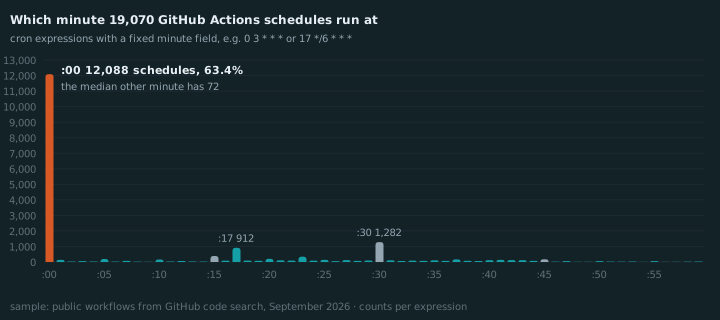
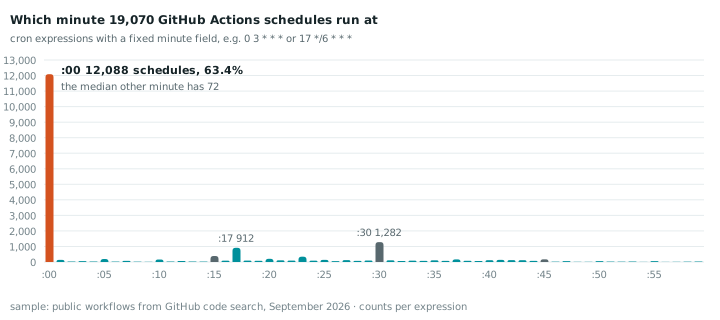
Of the 19,070 schedules with a fixed minute (0 3 * * * or 17 */6 * * *, not */5 * * * *),
12,088 run at :00. That’s 63%. Nearly four in five land on a multiple of five. Minute 56, the least popular,
appears 7 times.
Some of that is templates. The GitHub profile “snake” workflow shows up 387 times in our sample,
168 of them with 0 0 * * *, copied into profile repos by people who never read the cron line. But
counting one vote per account and expression barely moves it: still 63% at :00.
Jobs set to an hour pile up too. Of 16,728 schedules with a fixed minute and hour (daily, weekly or
monthly), 3,777 (23%) run at 00:00, 2,062 of them as plain 0 0 * * *. GitHub reads cron in UTC
unless the workflow sets a timezone:, so that’s one in five of them due in the same second,
worldwide. And 64% ask for somewhere between 00:00 and 06:59 UTC.
Two runners-up, since you’ve read this far:
- :17 is the third most popular minute. Someone read the docs.
- 199 schedules have a
*in the minute field but not in the hour, like* */12 * * *. That isn’t twice a day. It asks for every minute of hours 0 and 12, which is 120 runs.
What the herd costs on GitHub Actions
GitHub’s own docs say it plainly:
The
scheduleevent can be delayed during periods of high loads of GitHub Actions workflow runs. High load times include the start of every hour. If the load is sufficiently high enough, some queued jobs may be dropped. To decrease the chance of delay, schedule your workflow to run at a different time of the hour.
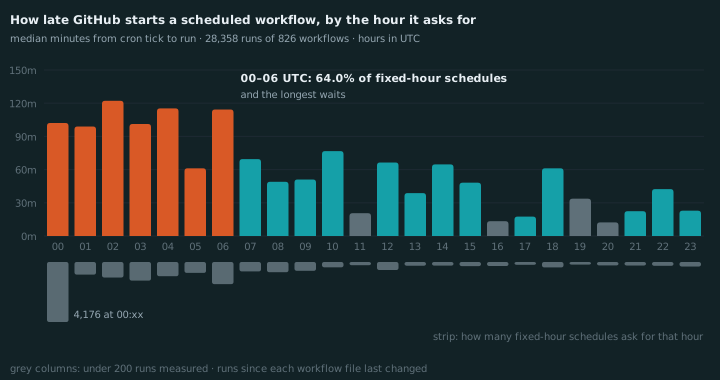
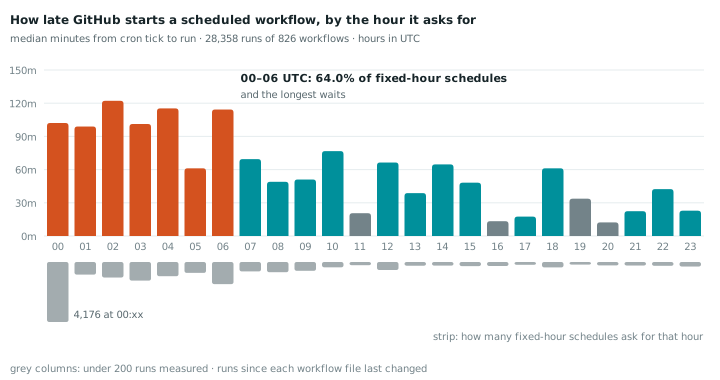
We measured it. For 826 workflows with a fixed-hour schedule, we took up to the last 100 scheduled runs since the workflow file last changed, 28,358 runs in all, and compared when GitHub created each run with when the cron line said it should.
They ran late across the board: a median of 78 minutes. The minute made no difference. Jobs at :00 waited a median of 77 minutes, jobs at every other minute 79. The hour made all the difference:
| Schedule asks for | Share of fixed-hour schedules | Median delay |
|---|---|---|
| 00:00–06:59 UTC | 64% | 103 min |
| 07:00–11:59 UTC | 15% | 56 min |
| 12:00–23:59 UTC | 21% | 44 min |
| 16:00–23:59 UTC | 13% | 35 min |
So GitHub’s advice is half right. The herd is real, but in 2026 it’s hours wide, not a minute wide.
Moving from 0 0 to 17 0 keeps you in the same queue. In our sample, jobs at 21:xx UTC waited a
median of 22 minutes.
Frequent schedules don’t just start late. Most of their runs never happen. For 427 workflows that run every few minutes or every hour, we counted how many of their ticks produced a run:
| Schedule | Asked for, per day | Ran, per day | Workflows |
|---|---|---|---|
*/5 * * * * | 288 | 12 | 64 |
*/10 * * * * | 144 | 10 | 61 |
*/15 * * * * | 96 | 10 | 49 |
*/30 * * * * | 48 | 11 | 44 |
0 * * * * | 24 | 9 | 139 |
17 * * * * etc | 24 | 8 | 70 |
Whatever you ask for, you get about ten a day. An every-5-minutes uptime check on GitHub Actions is an every-two-hours uptime check. And again, :00 isn’t what hurts: hourly jobs at :00 and at any other minute got the same eight or nine.
Your server has its own 03:00
GitHub is shared by everyone. Your VPS is shared by your own jobs, and they have the same habit.
Open a crontab that’s a few years old. The backup is at 03:00. So is the log rotation, the database dump, the search reindex, the sitemap, and the report someone added in 2023. On cron they all start in the same second, on a box with 2 GB of RAM and one disk. Each one takes three minutes alone. Together they take longer, the OOM killer takes an interest, and on a bad night the dump times out halfway.
Jenkins put it in its docs years ago: “using 0 0 * * * for a dozen daily jobs will cause a large
spike at midnight.”
The one-liner everyone copies
The fix that gets copied around:
0 3 * * * sleep $((RANDOM % 1800)) && /usr/local/bin/backup.shIn a Debian or Ubuntu crontab, it breaks twice. On RHEL, once.
Cron eats the %. Debian’s cron and cronie (RHEL, Fedora) both do this. From
crontab(5):
“Percent-signs (%) in the command, unless escaped with backslash (\), will be changed into newline
characters, and all data after the first % will be sent to the command as standard input.” So the
shell gets sleep $((RANDOM and nothing else:
$ sh -c 'sleep $((RANDOM '
sh: 1: Syntax error: Missing '))'
The backup never runs. The error goes to MAILTO, which on most boxes goes nowhere.
/bin/sh has no $RANDOM. Cron runs commands with /bin/sh, which is dash on Debian and
Ubuntu. Escape the % and it runs, but in dash RANDOM is just an unset variable, so the “random”
delay is always zero:
$ dash -c 'echo $((RANDOM % 1800))'
0
$ bash -c 'echo $((RANDOM % 1800))'
1392
No error, no jitter, and a crontab that looks fixed. (RHEL’s /bin/sh is bash, so there it’s only
the % that bites. Alpine gets away with it: BusyBox crond leaves % alone and its sh has
$RANDOM.)
The version that works everywhere has no % and no bashism. It’s what Debian’s own
certbot cron entry
uses:
0 3 * * * perl -e 'sleep int(rand(1800))' && /usr/local/bin/backup.shRandom is a coin toss
Say the sleep works. Five jobs, three minutes each, each sleeping a random 0 to 30 minutes. What are the odds that none of them overlap?
It has an exact answer. With n jobs of length d dropped at random into a window W, the chance that no two overlap is (1 − (n−1)·d/W)ⁿ. For five 3-minute jobs in 30 minutes that’s 0.6⁵, about 8%. On 92% of nights, at least two of them run at the same time. It’s the birthday problem with timestamps.
| Jobs | Each takes | Window | Nights with an overlap |
|---|---|---|---|
| 3 | 3 min | 30 min | 49% |
| 5 | 3 min | 30 min | 92% |
| 6 | 4 min | 30 min | 99.9% |
| 6 | 4 min | 60 min | 91% |
| 10 | 2 min | 30 min | >99.9% |
And you pay for it even on the nights it works. Every job waits 15 minutes on average, on a box that was idle the whole time.
Try it
Drag the sliders. Red bars overlap something. The RunWisp lane is the real scheduling logic, checked against the daemon; more on it below.
The simulator needs JavaScript. The table above has the numbers.
What the grown-up schedulers do
Here’s what the tools themselves offer.
| Tool | How it picks the start | Stops jobs on one box overlapping? |
|---|---|---|
Jenkins H | Hash of the job name. Stable, different per job | ✗ |
systemd RandomizedDelaySec= | Random per run. With FixedRandomDelay=true (v247), stable per machine | ✗ |
cronie RANDOM_DELAY | One random factor per daemon start, scaled per job | ✗ |
FreeBSD cron -j | Random, 60 seconds at most | ✗ |
| Kubernetes CronJob | Nothing. Requested since 2020 | ✗ |
| GitHub Actions | Nothing. Pick a quieter hour yourself | ✗ |
flock around each job | Not a delay. Jobs wait for the lock | ✓ |
RunWisp jitter | Next job starts when no other jittered job is running, never later than its window | ✓ |
The hashed ones are the right answer for the Let’s Encrypt problem. A fixed, different offset per machine spreads a fleet across the hour, and each machine stays predictable: the job runs at :23 every day, not at a new random time. AWS says the same in its Builders’ Library: for scheduled work, “we do not select the jitter on each host randomly,” because a stable number is easier to debug.
None of them solve the 03:00 problem on your own box, though. Offsets make collisions less likely. They don’t know that the backup is still running.
What RunWisp’s jitter does
RunWisp is ours, so apply the usual salt. jitter doesn’t sleep. It’s a cap on how late a job may
start, and the daemon uses that slack to run jittered jobs one at a time:
[defaults]
jitter = "30m"

[tasks.db-backup]
cron = "0 3 * * *"
run  = "pg_dump mydb | gzip > /backups/mydb-$(date +%F).sql.gz"

[tasks.search-reindex]
cron = "0 3 * * *"
run  = "/srv/app/bin/reindex"
When jobs share a tick, the next one starts as soon as no other jittered job is running. If
nothing else is running, nothing waits. Each job also gets a deadline inside its window, spread
evenly (0, 6, 12, 18, 24, 30 minutes for six jobs sharing a 30-minute window), and if an earlier job
is still running when a deadline comes, the waiting job starts anyway. Nobody starts later than its jitter, and the same config
always gives the same deadlines.
Here’s a real run: six jobs on */10 * * * *, jitter = "5m", each a sleep 45.
Times are seconds after the tick, from the run history:
task            due    started   ended
search-reindex  0s     0s        45s
files-backup    0s     45s       90s
invoices        0s     90s       135s
log-shipper     0s     135s      180s
db-backup       0s     180s      225s
sitemap         0s     225s      270s
And the same six with db-backup taking 200 seconds:
task            due    started   ended
files-backup    0s     0s        45s
db-backup       0s     45s       245s
invoices        0s     120s      165s    ← deadline, db-backup still running
log-shipper     0s     180s      225s    ← deadline
search-reindex  0s     240s      285s    ← deadline
sitemap         0s     285s      330s
One thing in there is worth being straight about: a long job doesn’t block the rest. Jobs
behind db-backup started at their deadlines, next to it. That’s the point of a deadline, but it
means “one at a time” holds as long as jobs fit in the window.
And what it isn’t:
- It’s per box. With nothing else jittered running, a job starts on time, so 10,000 servers with
0 0 * * *still hit Let’s Encrypt at midnight. For anything that talks to a shared service, pick an odd minute as well. - It only paces scheduled runs. Manual runs, retries and catch-up runs skip it.
- It’s not a dependency graph. If the reindex must wait for the backup, say so in the job, or use something like Dagu.
The run history shows when each job was due and when it actually started, so a delay is never hidden.
Fixes, cheapest first
1. Move off :00. Anything that hits a shared service (ACME renewals, API syncs, backups to S3) shouldn’t run at :00. Pick a minute once, at install time, and write it into the crontab:
echo "$(shuf -i 1-59 -n 1) 3 * * * /usr/local/bin/renew.sh"Different machines get different minutes and each one stays predictable, like Jenkins’ H.
On GitHub Actions the minute didn’t help in our data, but the hour did. Anything scheduled between 00:00 and 06:59 UTC is in the worst of the queue.
2. If you must sleep inside a crontab line, use the certbot form.
perl -e 'sleep int(rand(1800))' && works in any /bin/sh, and has no % for cron to eat. Or
put the sleep in the script, where % is just a percent sign.
3. On systemd, let the timer do it.
[Timer]
OnCalendar=*-*-* 03:00:00
RandomizedDelaySec=30m
FixedRandomDelay=true
AccuracySec=1us
AccuracySec=1us matters. The default is 1 minute, and systemd uses that window to pull timers
together to save wake-ups, which is the opposite of what you want here.
4. On one box, make jobs take turns. Put everything that shouldn’t overlap behind one lock:
0 3 * * * flock -w 3600 /var/lock/nightly.lock /usr/local/bin/backup.sh
0 3 * * * flock -w 3600 /var/lock/nightly.lock /usr/local/bin/reindex.sh
They run one after another, in no particular order. -w gives up after an hour so a
hung job can’t stall the rest forever. For a lot of boxes this is the whole answer, and it’s
already installed.
5. Or use a scheduler that does it for you. RunWisp’s jitter is option 4 with a deadline per
job and a run history that records every delay:
curl -fsSL https://get.runwisp.com | shIt’s one binary, GPL-3.0, with no locked features and no license key. crontab -l | runwisp import cron
converts your existing crontab. Then follow the
quick start, and
the jitter docs.
How we counted
Schedules. GitHub code search for cron path:.github/workflows language:YAML, sliced by file
size to get past the 1,000-results-per-query cap, on September 30, 2026. We kept files at exactly
.github/workflows/*.yml (the only place GitHub schedules from; code search also returns
.GitHub/ and nested copies), took every uncommented cron: value, and got 20,254 expressions
from 19,796 files in 19,141 repositories. Code search ranks by relevance, not at random, so read it
as a large sample, not a census. Per-minute counts are in
minutes.csv.
Delays. From a seeded random sample of 1,500 files with a single cron: line, plus 555 more
drawn from the every-few-minutes and hourly schedules for the drop table, we fetched the last 100
runs with event=schedule and the date of the file’s last commit, and kept runs created after it
(90% of them are from 2026). A run’s delay is its created_at minus the most recent tick of its
cron line at or before it. We only measured delays for schedules with a fixed minute and hour, so a
run can’t be matched to the wrong tick. The drop table counts the ticks between consecutive runs and
skips any gap longer than a day, since GitHub disables schedules in repos that go quiet and a
disabled stretch isn’t a drop.
The overlap odds are exact, not simulated. We checked the formula against 100,000 random nights per row, and the simulator’s RunWisp lane against the two real runs above, to the second.
Common questions
What is jitter in a cron job?
Does $RANDOM work in a crontab?
Why is my GitHub Actions scheduled workflow delayed?
What's the difference between RandomizedDelaySec and FixedRandomDelay in systemd?
Is there a cron scheduler with built-in jitter?
How do I stop cron jobs on one server from running at the same time?
Read next
-
Ubuntu 26.04 Rust coreutils (uutils) vs GNU: what changes for cron and shell scripts
Which uutils commands behave differently from GNU coreutils on Ubuntu 26.04 and 26.10, tested on 567 commands: mkdir locks, mv and mtime, timeout, date and DST, df, chown. How to check which you have and how to use GNU instead.
-
Debian cron vs cronie vs BusyBox crond: CRON_TZ, /etc/cron.d, env vars and syntax compared
How cron differs on Ubuntu, Debian, Fedora, RHEL, Arch and Alpine: which crons support CRON_TZ, read /etc/cron.d, pass Docker env vars, handle a bad crontab line, and accept seconds, L, W and #. Tested on six distros.